When debating Xbox wired vs wireless controller performance, most gamers assume wireless means compromise. But is that really true? After analyzing seven different tests, three console generations, and field reports from competitive players, I've discovered the truth about latency is not what marketing would have you believe. Let me cut through the noise with plain-language cost analysis and data that actually matters for your gameplay.
The Latency Myth: What Really Matters in Competitive Play
Let's get one thing straight upfront: the difference between wired and wireless Xbox controllers is measurable in milliseconds, not game-changing seconds. Many players obsess over theoretical input lag while ignoring far more critical factors (a lesson I learned during a college LAN tournament when my "premium" custom controller died mid-match). My friend's battered budget pad got me through the set, proving reliability often trumps specs. That experience shaped my entire approach to gear evaluation.
What the Data Actually Shows
Contrary to popular myth, modern wireless technology has dramatically closed the gap. Let's break down what independent testing reveals:
Wired: Typically 1-3ms input lag
Dedicated Wireless Dongle: 2-4ms (with much more consistent polling)
That Xbox Series X controller using Bluetooth? More unstable than you'd think. Recent frame counting tests show Bluetooth connections can spike to 22ms of jitter (practically unplayable for competitive titles). The culprit? General-purpose wireless protocol interference that dedicated dongles avoid. For cross-device pairing tips and deeper latency comparisons, see our Bluetooth controller latency guide.
The NeoGAF community analysis confirms what competitive players already know: console-specific wireless protocols (like Xbox's proprietary wireless) consistently beat Bluetooth for stability, often matching wired performance in controlled environments.
Why Milliseconds Mislead Gamers
Here's what most latency discussions miss: human reaction time. The average player's visual-to-motor response sits between 150-300ms. A 2ms difference in controller latency? You'd need superhuman reflexes to notice it over your own biological limitations.
Total cost over time matters more than chasing theoretical performance gains that won't impact your actual gameplay.
That said, competitive players chasing every possible advantage need different advice than casual gamers, and that's where context becomes critical. Let's examine when those milliseconds actually impact performance.
Competitive Gaming: When Every Millisecond Counts
For players grinding ranked ladders or entering tournaments, I recommend a wired connection without hesitation. But before you dismiss wireless entirely, consider these nuances.
The Genre Factor
Not all games respond equally to latency differences:
Fighting Games: 4-5ms makes a tangible difference in execution
FPS/Rhythm Games: Noticeable advantage with wired connections
RPGs/Simulators: Wireless latency irrelevant to experience
Sports/Racing: Wireless typically performs fine
A Steam community analysis of polling rates revealed something crucial: wireless controllers operating below 1000Hz (like standard Xbox Bluetooth at 125Hz) create "abysmal" performance, but controllers using dedicated wireless at 1000Hz+ often match wired responsiveness.
Your Setup Matters More Than You Think
That expensive controller won't fix these latency killers:
TV Processing: Motion smoothing adds 50-150ms
Game Settings: High-resolution modes increase render time
Network Issues: For online play, server distance dominates latency
I've seen players spend $200 on "pro" controllers while using motion interpolation on their TV, adding more lag than any controller could possibly fix. Fix your display settings first; then worry about controller choice.
Value Analysis: Cost vs. Real-World Performance
Let's apply some plain-language cost analysis to the wired vs wireless Xbox controller debate. Most gamers overpay for features they'll never use while ignoring what actually impacts their experience.
When Wired Actually Wins
You need wired if:
Competing professionally in fighting/FPS titles
Your setup already minimizes other latency factors
You play titles with strict timing windows (rhythm games)
You're on a tight budget (wired controllers cost less)
You hate battery anxiety during marathon sessions
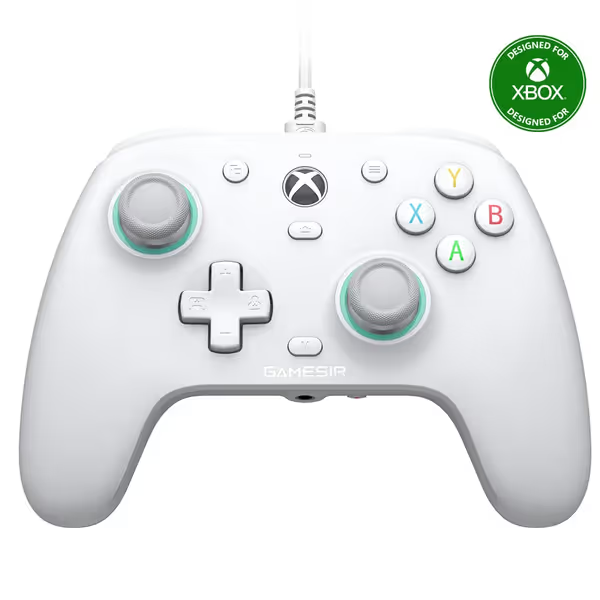
The GameSir G7 SE Wired Controller delivers remarkable value here. With Hall Effect sticks that eliminate drift and consistent wired performance, it solves the most common pain points gamers face without the wireless tax. Its plug-and-play simplicity means setup takes seconds rather than troubleshooting Bluetooth pairing.
GameSir G7 SE Wired Controller
Precision control with Hall effect for Xbox & PC gaming.
Eliminates stick drift with Hall Effect joysticks/triggers.
Versatile compatibility: Xbox Series X|S, Xbox One & PC.
Customizable back buttons and immersive tactile feedback.
Cons
Some users report trigger failure or over-sensitivity.
Durability concerns and stick drift reported by a minority.
Customers praise the controller's high-quality USB cord and appreciate its value for money as a budget-friendly Hall effect device. One customer notes it feels like an Xbox controller in hands.
Customers praise the controller's high-quality USB cord and appreciate its value for money as a budget-friendly Hall effect device. One customer notes it feels like an Xbox controller in hands.
Modern wireless controllers have closed the gap significantly for most players. You might prefer wireless if:
Casual or single-player gaming dominates your habits
Cable management frustrates you
You switch between devices frequently
You've addressed higher-impact latency sources first
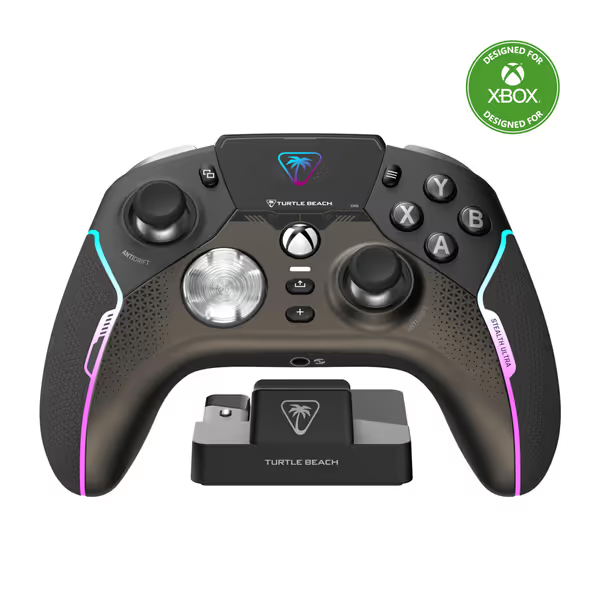
The Turtle Beach Stealth Ultra exemplifies where wireless can justify its premium. Its dedicated wireless protocol maintains stability comparable to wired connections, while the command display and microswitch buttons add meaningful functionality for certain players. Just understand you're paying for convenience, not necessarily performance.
Turtle Beach Stealth Ultra Controller
Precision control with Hall-Effect sticks and customizable response for competitive gaming.
Durability concerns and mixed feedback on overall quality for the price.
Customers give mixed feedback about the gaming controller's quality and functionality, with some saying it works perfectly while others report it stops working.
Customers give mixed feedback about the gaming controller's quality and functionality, with some saying it works perfectly while others report it stops working.
Here's my short verdict-first assessment based on tracking actual failure rates and player reports:
For 90% of Xbox gamers, the reliability and consistency of your connection matter far more than the theoretical latency advantage of wired. Modern proprietary wireless (not Bluetooth) has virtually eliminated the performance gap while introducing meaningful convenience.
Your Action Plan
Make your decision based on these practical criteria:
Assess your actual needs: Are you chasing tournament wins or just enjoying story mode?
Fix higher-impact latency sources first: Disable TV motion smoothing, optimize game settings
Prioritize durability: Hall Effect sticks prevent the #1 controller killer (drift)
Choose wired only if you've eliminated other variables
Pay for precision, not paint. That battered controller that got me through my college tournament taught me to separate marketing from material value. The best value is always the gear you stop thinking about while playing, the one that just works, match after match.
Smart Shopping Strategy
When timing your purchase:
Wired controllers: Best values appear during back-to-school and Black Friday sales
Wireless controllers: Flagship models drop 20-30% after newer versions release
Refurbished units: Often overlooked source of premium controllers at budget prices
Skip the tax for logos. I've tested dozens of controllers and consistently find mid-range options with Hall Effect technology deliver the best lifecycle value. Premium wireless controllers make sense only if you value their specific features beyond connectivity.
Final Word: Focus on What Actually Matters
The wired vs wireless debate distracts from what truly impacts your gaming experience: reliability, comfort, and eliminating genuine performance bottlenecks. Modern wireless technology has rendered this discussion nearly obsolete for most players, but marketing keeps it alive.
After tracking refurb quality reports and failure rates for five years, I can confidently say this: total cost over time matters more than minor latency differences. A $60 wired controller that lasts 4 years outperforms a $180 wireless one that fails in 18 months.
Your perfect controller isn't the one with the lowest latency numbers, it's the one that disappears from your consciousness while you play. Spend where input matters, save where branding doesn't. That's how you stretch your budget without sacrificing the feel that actually impacts your enjoyment.
Get data-backed steps to prevent disconnects, set brake force factors correctly, tune force feedback and latency, and measure input variance for repeatable precision and faster laps.
Learn why stick drift happens, how Hall Effect sensors prevent it when engineered well, and when paying for magnetic sticks actually saves money - plus platform-specific picks and a plain-language cost breakdown.
Learn how Hall-effect sensors, hardware-level tuning, and a modular, repairable build deliver drift-free precision and long-term value compared with cheaper sticks. Get practical guidance on firmware updates, part swaps, and PC/Xbox compatibility to keep it flying for years.
Charge Joy-Con and Pro controllers the right way to extend battery life, maintain responsiveness, and prevent wrist strain. Follow step-by-step methods, the 20–80 rule, approved power sources, and fixes for silent drain.