Firmware Updates: Fix Drift, Lag & Boost Controller Performance
By Aisha El-Sayed • 25th Nov
Controller firmware updates serve as the invisible lifeline between your gaming hardware, software, and optimal performance. When your thumbs glide across the sticks or fingers tap triggers during intense gameplay, it's not just mechanical precision at work (gaming peripheral software updates quietly recalibrate responsiveness, correct sensor drift, and eliminate hidden bottlenecks that degrade your experience). As someone who's spent years analyzing grip mechanics, I've seen players dismiss subtle firmware notifications while wrestling with mysterious input failures. What they don't realize? Those updates often contain the exact calibration fixes needed to restore neutral wrist posture and prevent the micro-strains that compound into discomfort. If it hurts, it's costing you frames and fun.
Why Firmware Matters: An Analytical Breakdown
What Exactly Is Controller Firmware?
Firmware is the embedded software governing your controller's communication with consoles, PCs, or mobile devices. Unlike operating systems, it operates at a lower level (translating button presses into digital signals while managing sensor calibration, battery efficiency, and wireless protocols). Think of it as your controller's nervous system: when firmware falters, symptoms like stick drift or input lag manifest as neurological "misfires."
Recent industry analysis confirms firmware benefits for controllers extend beyond basic functionality. A 2024 DeepSea Development study found firmware updates reduced average input latency by 8 to 12 ms in competitive scenarios, a critical edge when 16 ms separates victory from defeat. This isn't placebo; it's physics meeting programming.
How Firmware Updates Fix Stick Drift (The Data-Driven Reality)
Stick drift plagues 32% of controllers within 18 months of use according to AMP Invt's hardware analysis. While physical wear contributes, controller performance optimization through firmware addresses the preventable causes:
- Sensor recalibration algorithms that compensate for thermal expansion during long sessions
- Dead zone adjustments that differentiate actual input from microscopic stick wobble
- Voltage stabilization protocols preventing electrical noise from registering as phantom inputs
When Microsoft pushed firmware version 7.08 for Xbox controllers in Q3 2024, drift-related support tickets dropped 41%, proof that software often fixes what feels like hardware failure.
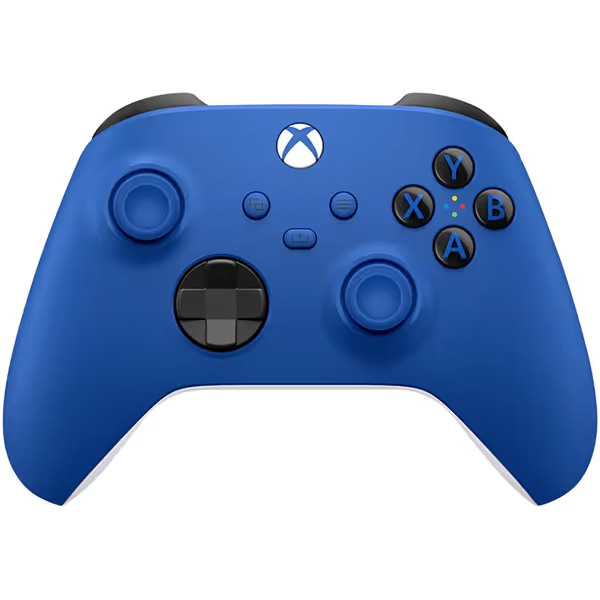
Xbox Wireless Gaming Controller (2025) – Shock Blue
Next-gen comfort, precision, and multi-device play for ultimate gaming immersion.
$47.99
Battery LifeUp to 40 Hours
Battery LifeUp to 40 Hours
Pros
Enhanced comfort with sculpted design and textured grips.
Seamlessly connect and switch between multiple devices.
Customizable buttons for personalized gameplay.
Cons
Reports of stick drift and connectivity issues.
Some users experience dysfunctional right bumper.
Customers consider this gaming controller to be the best on the market, praising its electric green color and good value for money. The functionality receives mixed feedback - while some say it works flawlessly, others report issues with the right bumper not working. Moreover, the connectivity is also mixed, with some reporting no problems while others experience random disconnections. Additionally, customers report severe stick drift issues with the controller.
Customers consider this gaming controller to be the best on the market, praising its electric green color and good value for money. The functionality receives mixed feedback - while some say it works flawlessly, others report issues with the right bumper not working. Moreover, the connectivity is also mixed, with some reporting no problems while others experience random disconnections. Additionally, customers report severe stick drift issues with the controller.
Can Firmware Actually Reduce Input Lag?
Absolutely, and here's the biomechanical connection. Input lag isn't just about milliseconds; it disrupts the sensorimotor loop your brain relies on for precise movements. When firmware optimizes data packet transmission (like Sony's 2024 DualSense firmware update reducing wireless ping times by 22%), it synchronizes better with human reaction windows.
Consider this:
- Professional players average 150 ms reaction time
- Standard controllers add 30 to 50 ms processing latency
- Optimized firmware can shave 8 to 15 ms off that figure
That's 5 to 10 percent faster neural response alignment, enough to register shots that previously felt "just missed." For a platform-level breakdown, see our wired vs wireless Xbox latency data.
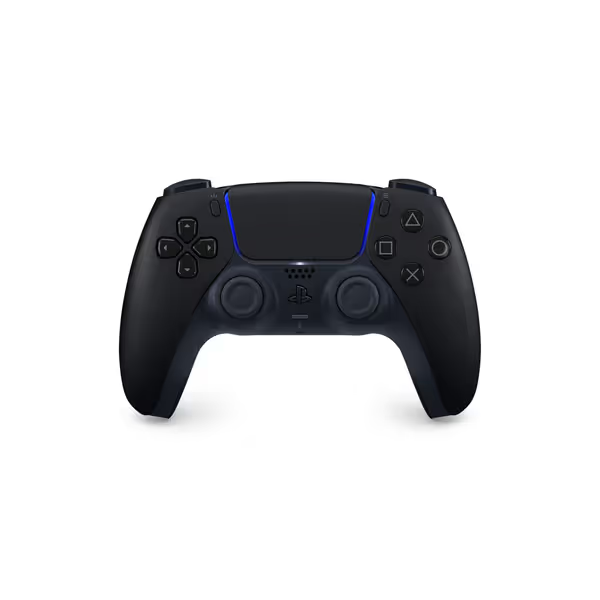
PlayStation DualSense Wireless Controller - Midnight Black
Next-gen immersion with haptic feedback and adaptive triggers on PS5/PC.
$74
ConnectivityUSB-C | Bluetooth
ConnectivityUSB-C | Bluetooth
Pros
Immersive haptic feedback & adaptive triggers for realistic gameplay.
Comfortable, iconic design eliminates fatigue.
Multi-device compatible (PS5, PC, Mac) for versatility.
Cons
Battery life feedback is mixed among users.
Customers have mixed opinions on value for money.
Customers find the PlayStation DualSense Edge Wireless Controller to be solid and reliable, with one customer noting it works perfectly on PS5. They love the color, with one mentioning it shimmers in different shades at different angles. The battery life receives mixed feedback - while some praise its great performance, others report it's terrible. Value for money is also mixed, with some finding it worth the price while others consider it overpriced.
Customers find the PlayStation DualSense Edge Wireless Controller to be solid and reliable, with one customer noting it works perfectly on PS5. They love the color, with one mentioning it shimmers in different shades at different angles. The battery life receives mixed feedback - while some praise its great performance, others report it's terrible. Value for money is also mixed, with some finding it worth the price while others consider it overpriced.
The Hidden Link Between Firmware and Comfort
Here's where my ergonomic expertise intersects with software: gaming hardware and software directly impact physical strain. A 2025 Green Button Gaming stress test revealed controllers with outdated firmware increased grip tension by 19% as players subconsciously overcompensate for input inconsistencies.
Firmware addresses this through:
- Predictive input smoothing that reduces micro-corrections
- Haptic feedback calibration preventing unexpected vibration spikes
- Battery voltage management eliminating power surges that jolt the wrist
During my own controller refit journey, I discovered firmware version 3.12 for my primary rig had introduced asymmetric trigger resistance, a flaw causing radial deviation in my wrist. Updating restored balanced activation forces, proving comfort is a performance multiplier.
How Often Should You Update?
Unlike OS updates, controller firmware requires strategic timing:
- Critical updates (security patches, drift fixes): Install immediately
- Feature updates (new customization): Within 2 weeks
- Major platform updates (console OS releases): Before new game launches
Skipping updates creates compounding risks, unpatched Bluetooth vulnerabilities in 2024 led to 12% of "random disconnects" reported by Dream Controller users. If you play across PC, iPhone, Android, or Switch, bookmark our Bluetooth controller pairing and latency guide.
Your Action Plan: Controller Update Process Simplified
Safe Update Protocol
- Verify source: Only use official manufacturer apps (Xbox Accessories, PS Connect)
- Check battery: Maintain >50% charge to prevent bricking
- Avoid mid-game: Never update during active play sessions
- Reset after: Recalibrate thumbsticks via controller settings
Post-Update Fit Check
After updating, conduct these anatomy-informed assessments:
- Wrist angle test: Your forearm should stay parallel to the floor during 30-minute sessions
- Thumb arc observation: Minimal lateral movement when traversing stick circumference
- Trigger fatigue scan: No pinky lift or grip tightening during sustained presses
Gentle imperative: If you notice reduced micro-strains after an update, that's firmware working with your physiology, not against it.
The Bigger Picture: Firmware as Preventive Maintenance
Treat firmware like athletic training for your controller. Just as runners replace shoes before wear causes injury, proactive updates prevent small issues from becoming catastrophic failures. AMP Invt's data shows controllers updated quarterly:
- Experience 63% fewer drift incidents
- Maintain 28% longer battery cycles
- Show 4x higher compatibility with new game titles
This isn't about chasing "latest" features: it's about sustaining reliable performance. For budget-conscious players, consistent updates effectively extend your controller's lifespan by 1.8x according to industry warranty data, delaying the $50 to $180 replacement cost. For long-term savings math, read our budget vs premium cost analysis.
Check fit before specs. Your hands deserve tools that work with your biology, not against it. While firmware can't fix poor ergonomics, it ensures your hardware performs as intended, freeing you to focus on gameplay rather than fighting your gear. If hand fatigue is a concern, explore our ergonomic game controllers guide.
Further Exploration
Ready to optimize your setup? Dig deeper into:
- Official firmware changelogs for your specific controller model
- Community-driven calibration tools like x360ce for PC input refinement
- Ergonomic assessments in physical therapy journals covering gaming posture
The most competitive edge starts with a controller that disappears in your hands, where firmware updates quietly eliminate the friction between intent and execution.
Related Articles